
Do you know Christmas could be one of the most profitable season for you if you know the right products to sell on it? In this post, we’re going to see Christmas Google Sheets to sell on Etsy.
Now, if you open Etsy, you will find a lot of printable products to sell on Christmas. This is similar to Thanksgiving and other holidays. But Google Sheets make another smart digital product to sell on Etsy.
Holiday products are different from evergreen products as there is a timed demand that you need to meet to make sales. People don’t buy Christmas products in March. This urgency makes holiday templates among the highest-converting products on Etsy.
Why Christmas Google Sheets Sell Well
Buyers arrive with a problem and a deadline. Someone looking fora gift tracker in mid-November know exactly what they need and when they would use it. This removes the hesitation as they already know the need, they’re looking for right tool to fix the need.
The emotional stakes are high. Christmas overspending, Thanksgiving hosting chaos, and New Year goal-setting all carry emotional weight. A product that relieves holiday stress has more perceived value than the same features in a non-seasonal context.
Christmas Google Sheets to sell on Etsy
1. Christmas Gift Tracker
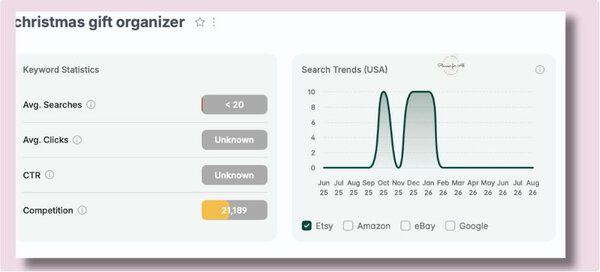
The first one I’ll start off with is probably the most searched Christmas product on Etsy. Anyone who buys gifts needs a tracker to organize their spending, keep track of recipients and to make a registry of what people requested and what has already been purchased.
What to include: Make sure to include recipient list with relationship and budget per person.Add a gift idea column and status to keep track of whether it has been bought or not.Add reminders to ship and send on time to keep them accountable.
2. Secret Santa and Gift Exchange Organizer
As fun as playing Secret Santa can be, it gets a bit difficult to keep track of who is giving what. This is perfect for snyone coordinating a Secret Santa, White Elephant, or gift exchange for a workplace, family, or friend group. People buy this as coordinating a gift exchange across multiple people is really difficult. I’ve coordinated many Secret Santas in my workplace, and I always turned to a trusty spreadsheet to keep track of everything.
What to include: You want to include participant list with name, email, and wish list entries.Also add an assignment tracker, budget per person, gift ideas per participant, and exchange event details. You can also add-in match list to show who is gifting whom.
3. Christmas Savings Tracker
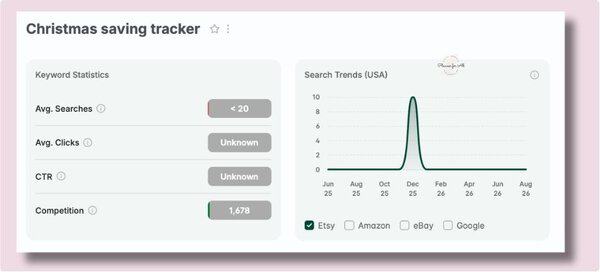
This is a holiday themed version of Saving Tracker. This is perfect for someone who ends up overspending on Christmas. A better way is to save throughout the year and reserve funds for Christmas holidays.This savings tracker helps them create a budget and ensure enough funds are reserved for Christmas.
What to include: As this is a holiday version of saving tracker, you want to include a Christmas Budget, which will work as target for all savings. Then add monthly savings goal with contributions tracker, a progress tracker to show how much fund has already been saved and remaining amount yet to save. You can also include a chart to show much they need to save per month to meet the target and where they currently are.
4. Christmas Card Tracker
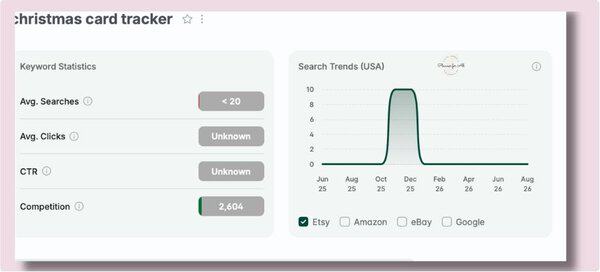
This is for anyone who sends Christmas cards to a list of 20 or more people and needs to manage addresses, sent/received status, and changes from year to year.
What to include: The purpose with this is to keep it as simple as possible. Include contact list with name, address, and relationship. Card sent and received checkboxes per contact. Also, include year-over-year tab showing who was on the list last year but not this year. You can also include stats to show various statuses, countdown to Christmas, and add little fun animation to make it fun.
5. All-in-One Christmas Planner
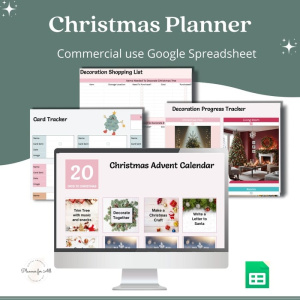
This is a premium product that includes almost all of the above products, and more. The is perfect for someone who wants one Google Sheet to handle everything Christmas related, including gifts, budget, cards, food, decorating, events, and traditions.
What to include: You want to include a version of all the products mentioned above. You want to have a gift tracker, Christmas holiday budget tracker, card tracker, Christmas Eve and Christmas Day meal planner with recipes and grocery list. You can also include decoration checklist, traditions tracker advent calendar planner.
As you can see, this one planner includes everything and it can be a premium product that helps your customers to plan complete Christmas from one dashboard.
New templates in your shop every month
You’ve got product ideas and list of what to include in each one. That’s more than 5 spreadsheets to design, build, and test during the busy holiday season.
The Savvy Template Hub is the shortcut. Every month, new done-for-you templates land in your account, already built and tested, with commercial use rights included.And related keywords and listing template so you can list them in a day.You rebrand them and list them. No need to build anything or find the keywords you can rank for.
You bring the brand. I’ve already done the product and marketing part.
Frequently Asked Questions
1. When is the good time to publish Christmas Google Sheets
Etsy typically needs four to eight weeks to index a new listing before it appears in search results. So, you want to list your Christmas products by September end or October. One trick to build authority for your listing is to add two listings – one dated and the other undated. Your dated listing drives seasonal traffic while undated listing can stay active year round and silently bring traffic.
2. Should I build Christmas templates or focus on evergreen products first?
Depends where you’re in your Etsy journey. Are you starting in Q1 or Q2, list evergreen products. If you’re in nearing Q3 start with Thanksgiving then move on to Christmas products.
3. Which version should I make, Excel or Google Sheets?
Start with Google Sheets, you can offer Excel version later.
Where to Start
Start with Christmas Gift tracker or holiday budget tracker. It is one of the highest-volume holiday product. Then create Christmas meal planner and activities planner. Or you can grab the PLR Christmas Planner Google Sheets with advent calendar/gift organizer/ Christmas meal planner, customize it and start selling in a day. Whichever product you want to start check Etsy keyword tool like eRank before creating.
Which holiday template are you building first? Drop it in the comments.
