
Airbnb Booking Calendar
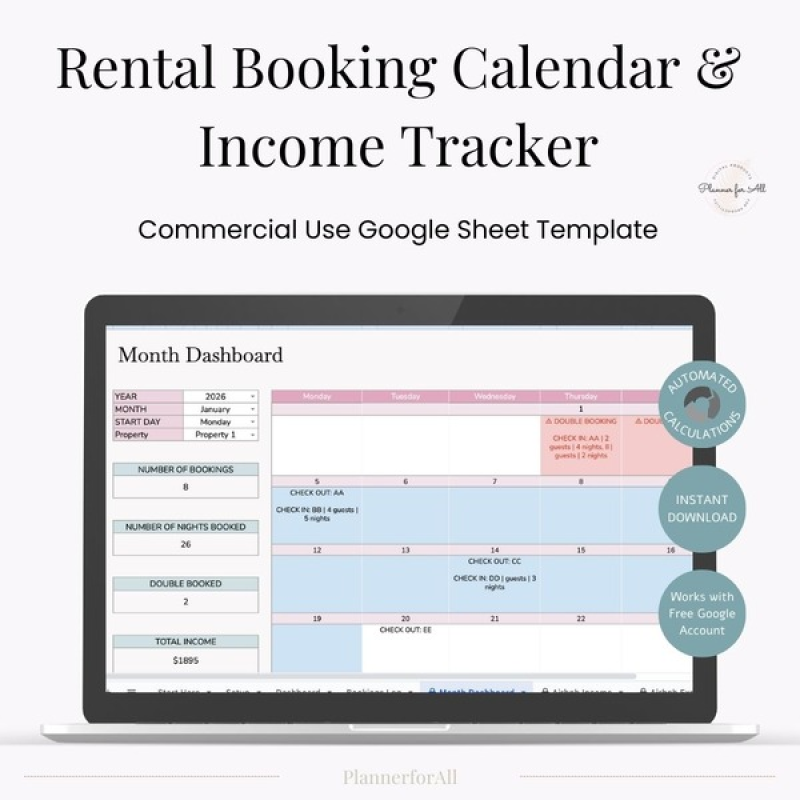
✨ Airbnb Booking Calendar & Bookkeeping Planner
Want to sell a high-demand low competition Google Sheet spreadsheet in your store?
This Airbnb Booking Calendar & Income Expense Planner is a professionally designed Google Sheets spreadsheet created for Airbnb hosts who want a simple, organized way to manage bookings, finances, and performance.
Designed with clarity and usability in mind, this planner helps track bookings, income, expenses, auto-calculated profit & loss, occupancy, ADR, all from your booking transaction data. Created for Airbnb hosts, this is ideal for managing up to 10 properties and assessing performance at both a monthly and annual level.
But Does this Sell?
People are looking to simplify their rental property business. They want to simplify the booking system without relying on complicated software.
What Is It?
This Airbnb Booking Calendar Template is designed in Google Sheets and makes it easy to track booking schedules, income, expenses, and see the performance of the proerpty over a month or years.
What’s Inside the Airbnb Booking Calendar
This done-for-you Google Sheets planner includes everything your customers need to organize their rental business:
Visual booking calendar to track booked nights, check-ins, and check-outs
Built-in double booking detection
Income & Expense tracking with automatic profit calculations
Track key performance metrics: night booked, occupancy, ADR
Monthly & annual dashboards for quick insights
This planner is suitable for Airbnb-style rentals, Vrbo listings, and other short-term rental businesses.
See it in action
How can you use this template?
You get commercial rights to the template, meaning you can sell this as a product on your Etsy, Shopify, or website shop. You can sell this as a personal-use product only, meaning your customers can use this only for personal use. They cannot sell this or use this template for any commercial use.
What you can do with this template:
- Sell: You can customize and sell this in your Etsy or Shopify store
- Giveaway: You can give it away as a gift to build your email list
What you can't do with this template
- You CAN'T pass on commercial rights to the template. You can only give personal use rights to your customers.
Frequently Asked Questions
What can I do with this PLR Airbnb Booking Calendar template?
You can rebrand it, customize the colors and fonts, add your shop name, export it, and sell it as a finished digital planner on Etsy or your own website. You keep all profits from every sale.
Can I sell the editable file?
No. You can sell the finished end product, but you cannot sell or give away the editable Google Sheets version as a PLR item.
Is this planner beginner friendly for Etsy sellers?
Yes. You only need basic editing skills to add your branding and prepare the file for your customers. Everything is already designed and automated, which saves you hours of creation time.
Do my customers need special software to use it?
No special software needed. The planner works in Google Sheets which is free and accessible on any device.
Can I change layouts, colors, or add new pages?
Yes. You are free to customize the planner to match your brand or your Etsy shop aesthetic.
Will this help my shop stand out?
Definitely. Most faith planners on Etsy are PDFs. Offering a spreadsheet-based, interactive Christian planner gives you a unique product that buyers appreciate and search for.
How fast can I start selling it?
You can list your version as soon as you add your branding and export your customer-ready file. Many sellers launch within the same day.
Is the automated dashboard included?
Yes. The dashboard is fully set up and updates automatically so your buyers always see their progress at a glance.
What file formats do I receive?
You receive the Google Sheets template plus PLR usage rights so you can customize and resell the finished version.
NOTE: You will receive access to the file once the payment is complete. As this is a digital download with PLR rights, there are no refunds. All sales are final.