Today we are going to see the best Google Sheet spreadsheets to sell in Quarter 1.
Quarter 1 is when buyers hit reset. They want better money, fitness, or in general make better habits. They just want simple tools that work today.
If you sell digital products on Etsy, Google Sheet templates are a fast way to tap into that demand. You can create digital products that cater to these demands and have several listings in your store this week.

In this post, we will see the best Google Sheet templates to sell now in Q1, and what to include so they actually sell, not sit in your shop collecting views.
Key Takeaways
- Demand for yearly planners increases in first quarter as people want better results in new year
- Budget, debt payoff, and savings trackers are in demand and bring in buyers with money goals.
- Habit trackers and 90-day goal planners sell well as they fit New Year routines and reset energy.
- Fitness planner and weight loss trackers are also in-demand products
These are not random product suggestions. These are based on market research and demand based on my experience selling digital products over years.
Why Q1 Is Perfect For Selling Google Sheet Templates
Q1 is when people decide, “This year will be different.” They want to track where their money goes, fix bad habits, and finally organize their side-hustle numbers.
They buy planners, trackers, and simple money tools that help them feel in control. On top of that, tax season and early-year business planning push small business owners to look for quick, ready-made spreadsheets.
The best Google Sheet templates to sell now match these Q1 needs: clean money trackers, habit and goal planners, and straightforward business sheets that save buyers time.
Best Google Sheet Templates To Sell Now In Quarter 1
1. Budget And Expense Tracker Google Sheet

Money resets are huge in Q1 as it ties neatly to better money habits resolution. A clean monthly budget and expense tracker is one of the easiest Google Sheets to sell and definitely one of the most searched.
Buyers want to see their income, track their expenses, decide where they are investing or spending most money. A simple debt payoff line and a summary chart that shows “spent vs budget” by category gives it extra value.
You can easily give different flavors to this template in a few ways:
- Make it specific to a single-income family budget
- Target it for student budget on a small income
- Side-hustler budget that includes business income
Want a shortcut? Check out this Done-For-You Monthly budget planner Google Sheet template that you can customize and sell quickly.
2. Savings & Debt Payoff Tracker
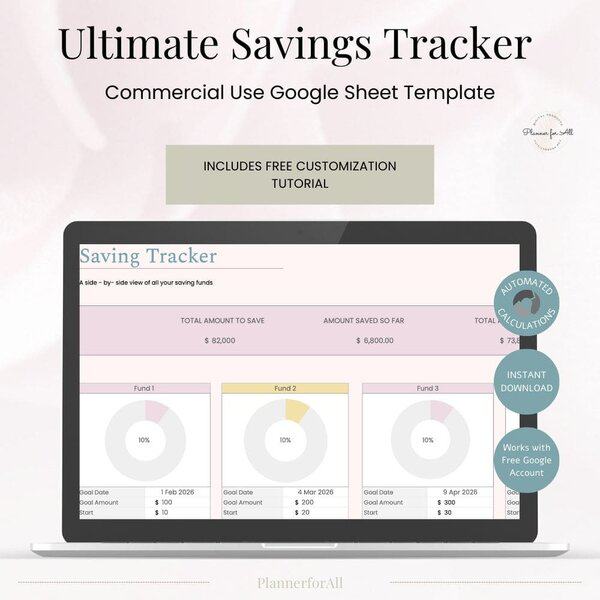
An extension of #1 product, a lot of people prefer savings & debt payoff tracker in Q1.These templates bring in highly motivated buyers who are ready to take control of their money.
What to include in Savings & Debt tracker
Unlike budget tracker, the focus of Savings & Debt tracker is just on saving money. While you can include these sections in budget planners, a lot of people want dedicated trackers to meet their goals. It’s meeting your clients what they need.
You can include:
- Total savings goal
- Monthly savings log
- Progress bar or percentage
- Debt snowball or avalanche layout
- Payment history
- Estimated payoff date
These are simple but incredibly satisfying for buyers to use, making them strong repeat sellers.
3. Habit Tracker And Daily Routine Planner Sheet
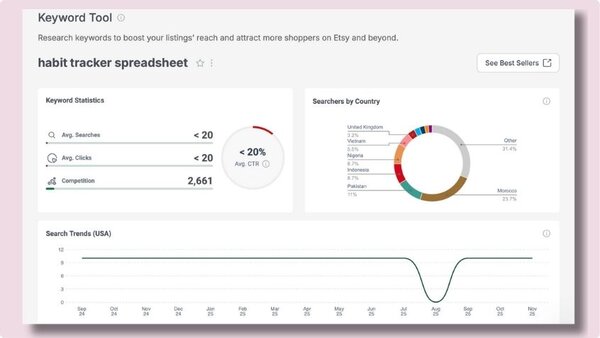
Developing new and better habits is one of the most common New Year resolution. And it is not just about money. Many people want to move more, drink more water, read, or quit social media. A habit tracker Google Sheet fits that need nicely.
A solid habit tracker can include:
- A monthly grid with days across the top and habits down the side
- Simple color fill or checkboxes for completed days
- Automatic streak counts and longest streak for each habit
- Weekly or monthly summaries to see hit rate for each habit
If you want to provide more value, you can also include a small daily routine planner section with time blocks for morning and evening. That gives more value without making the sheet confusing.
Here are some niche habit tracker ideas:
- Habit tracker for workouts, water, and steps
- Morning routine planner with mindset, planning, and movement
- Business habit tracker for posting, emailing, and product work
If you want a ready-made product to sell, take a look at Ultimate habit spreadsheet tracker. It splits habits by month and keeps layouts repeatable.
4. 90 Days Goal Planner Spreadsheets
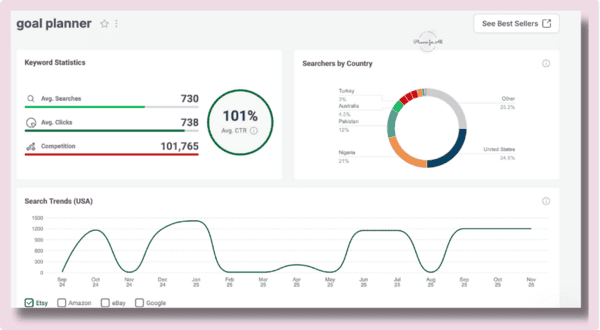
So what’s the difference between a normal goal planner and a 90-days goal planner? Normal goal planner helps people to plan their long-term (12-months or similar) goals, while 90 days goal planner only focuses on goals for the next 90 days. It is much easier to plan and attain those 90 days goals. Even software development companies(my background) have adopted 90 days planning.
Naturally, people set huge yearly goals in January, but often feel lost by March. A Q1-focused goal planner and dashboard helps them break the year into a simple 90-day window.
Your sheet can start with a high-level page that asks buyers to set their top 3 Q1 goals. Under each goal, give room for:
- Measurable outcome
- Why it matters
- Deadline
- Key action steps
You can also add a progress dashboard that gives a visual track of their progress. A simple progress bar will work to give them a visual indication of their progress.
Here are some goal planner ideas for different niches:
- Create a Q1 business goal planner for content, revenue, and product launches
- A personal growth goal planner that will help people track their health, learning, or family time goals
- Another goal planner related to content creation for YouTube, Instagram, or blogs
5. Fitness Planner Spreadsheets
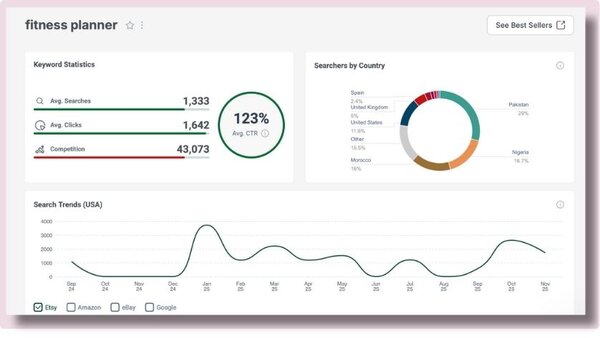
Getting fit is probably one of the most common New Year resolutions (or is it only me!!). From beginners starting fresh to returning gym-goers rebuilding routines, a Fitness Planner Spreadsheet gives buyers one place to track their journey
Naturally, demand for fitness planners also rises in the first quarter.
What to include in your fitness planner spreadsheet?
It depends on how simple or extensive you want it to be. You can offer a full blown fitness planner spreadsheet that help them track their reps, measurements, meals. Or you can offer a simple weight loss tracker that helps them to track their weight loss journey.
In a nutshell, your fitness planner should include:
- Weekly workout schedule
- Exercise logs and reps/sets tracking
- Weight or measurement progress chart
- Water intake and step tracker
- Monthly fitness summary
Easy variations to make multiple listings
- Beginner fitness planner
- Weight loss tracker
- Strength training log
- Running or cycling tracker
- Wellness planner (movement + habits + sleep)
Frequently Asked Questions
1. How much should I charge for a Google Sheet template on Etsy?
Most simple Google Sheet templates sell between $5 and $25. You can also bundle multiple sheets to offer one comprehensive spreadsheet to charge a higher price. Research Etsy, eRank and other platforms to come up with price for your products.
2. Do I need advanced spreadsheet skills to sell these?
Not really. You don’t need advanced spreadsheet skills to sell one. Basic skills can help you to create demand-worthy spreadsheets.
3. How many templates should I start with?
While platforms like Etsy prefer more products, start with 1 or 2 strong templates and get them live. You can cut down your time by buying PLR spreadsheet template and customizing them to sell in your store.
4. How do I deliver Google Sheet templates to buyers?
Once your spreadsheet is ready, copy the shared link and paste it in a PDF document. Upload that PDF to Etsy as the digital file. You can use a professionally designed PDF document to increase the WOW factor of your shop.
5. Do I need to offer Excel versions too?
You can, but you don’t have to. Many Etsy buyers are happy with Google Sheets only. If you want to reach more people, you can later create an Excel version and offer it as a second file in the same listing.
6. How detailed should the instructions be?
The purpose of instructions is to make it easier for your customers to use your spreadsheets. Add a one-page “Start here” tab in your spreadsheet with instructions or link to video tutorial. Use plain language, add 2 or 3 screenshots, and tell buyers where to click and what to edit first.
7. Where can I buy premium Google Sheets spreadsheets to sell?
At PlannerforAll you’ll find an extensive catalogue of Google Sheets PLR Spreadsheets that you can customize and sell in your store.
Conclusion
As you can see, you don’t need a huge shop to tap into Q1 demand. Start with one or two high-value Google Sheet templates to sell in Quarter 1, give them clean layouts, and write simple instructions that make buyers feel supported.
Focus on problems buyers already feel in quarter 1: money stress, disorganized routines, lack of direction and habits that are off track. Your templates give them structure and clear next steps.
Start small, improve with every listing, and let customer questions guide your next idea. Your Etsy shop can grow one useful, well-designed Google Sheet at a time.
Recommended Templates
- 90 Days Planner Spreadsheet
- Fitness Planner Spreadsheet
- Ultimate Habit Tracker Spreadsheet
- Savings Tracker Spreadsheet
- Monthly Budget Planner Spreadsheet