
Is Google Sheets better than Excel? You want to sell spreadsheets but wondering which out of Excel vs Google Sheets, sells the most? In this guide we will see detailed comparison of Excel & Google Sheets for creators selling spreadsheet templates.
I know, you’re already strapped for time, and you certainly don’t want to create a 47 point pros and cons list of both tools to find the most profitable side hustle idea. That’s where I come into picture.
I’ve created spreadsheets in both Excel (for my job), and Google Sheets (in my biz) and I can help you with which spreadsheet templates you should sell on Etsy.
So here’s the in-a-single-line answer right upfront:
Excel templates sell well to a smaller but more niched audience.
If your buyers are busy moms, students, creators, coaches, or solopreneurs → start with Google Sheets.
If your buyers are corporate, finance, or analysts → Excel is your niche goldmine.
Now that’s out of the way, let’s walk through everything you actually need to know to have a profitable Etsy store selling spreadsheets.
Similarities between Excel vs Google Sheets
Before jumping to what’s the right solution, let’s see similarities between Google Sheets & Excel. Both are spreadsheet powerhouses and have their own strengths. So, let’s see how they are similar to each other.
Excel brings power, speed, and depth. Google Sheets brings ease of sharing, access, and free access with Google account. You can design and ship most spreadsheet templates in either tool as both the tools offer core features needed to provide a smooth customer experience.
- Formulas: Both support essential Math formulas like,
SUM,AVERAGE,IF,COUNTIF,VLOOKUP,XLOOKUP,INDEX/MATCH. You can easily create budgeting, planning, reporting, or tracking templates in both the tools. - Formatting: You can use styles, number formats, conditional formatting, borders, color coding, and custom date or currency formats in both. You can label tabs, style headers, and lock inputs the same way.
- Charts: Both tools offer column, bar, line, pie, and combo charts. Great for dashboards and KPI views.
- Pivot analysis: Though not normally used for selling spreadsheet templates, pivot tables and slicers are great for quick summaries. You can use these for sales trackers or expense reports. Both tools handle grouping, filters, and basic calculated fields. So you’re covered there.
- Add-ons and scripts: Light automation is possible in both. Excel supports Office Scripts and VBA, Sheets uses Apps Script. For shops, stick to simple automations like reset buttons or import helpers to reduce support.
- Import and export: Again something not really important when selling templates, but CSV, XLSX, and PDF exports work in both. You can import CSV product feeds or export printable planners without losing layout.
To give an example of a template that works well in both: you can easily create a monthly budget with dropdown categories, a spend tracker, a pivot for totals by month, and a line chart in both the tools.
Excel vs Google Sheets
Now that we have seen the similarities, let’s jump on to where they both differ.
The main difference between Excel vs Google Sheets becomes visible when you consider usage, cost, layouts. These are the things your buyers care about, not Power Pivot or solver tools.
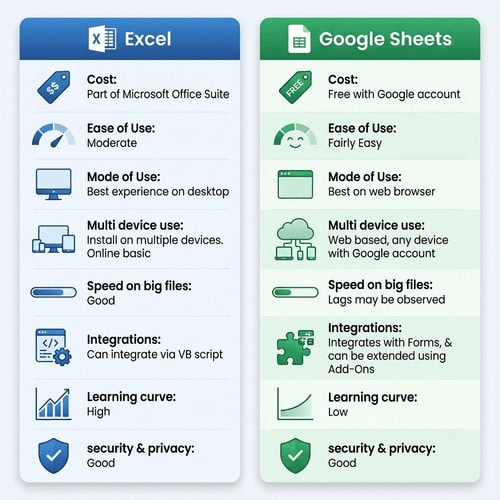
Here is a brief comparison between Excel & Google Sheets.
|
Feature |
Excel |
Google Sheets |
|---|---|---|
|
Cost |
Part of Microsoft Office Suite |
Free with Google account |
|
Ease of use |
Moderate |
Fairly Easy |
|
Mode of use |
Best experience on desktop |
Best on web browser |
|
Multi device use |
Need to install Excel on multiple devices. Online use is basic. |
As this is web based, it can be used from any device with same Google account |
|
Speed on big files |
Good |
Lags may be observed |
|
Integrations |
Can integrate via VB script |
Integrates with Forms, & can be extended using Add-Ons |
|
Learning curve |
High |
Low |
|
security & privacy |
Good |
Good |
Cost of use
Price is a critical thing to keep in mind when selling templates. Excel is a part of MS Office suite which is a paid product with varied pricing based on usage, while Google Sheets is included with free Google account.
If your target audience is an existing subscriber of MS Office then Excel makes sense for them. Otherwise Google Sheets makes more sense as your customers will be able to use Google Sheets with free account.
Winner: Google Sheets
Ease of use
“How easy it is for my users to use it?” is the next question to keep in mind after the price.
If your buyers are new to spreadsheets, start where the setup feels light and fast. For template shops, the Excel vs Google sheets choice often comes down to how quickly someone can open, understand, and use your file. You want to make it easy for your customers to copy, understand and use your spreadsheets.
For someone just starting with spreadsheets, Excel may seem a bit intimidating while Google Sheets may feel more friendly with easy, clean, and familiar layout.
Winner: Sheets wins for quick access and low friction
Access and multi-device use
Excel’s desktop app is reliable offline and feature complete. Though it has an online mode, it not as robot as Google Sheet.
Multi-device sync is where Sheets really shines. As it is available with Google account, you can use it on multiple devices (phone, laptop, tablet) with same account. It will automatically sync data across all devices making it super easy to work on it.
Winner: Google Sheets
Speed on big files
Excel stays fast with big ranges and array formulas. Sheets can slow with many volatile formulas, large images, or tens of thousands of rows.
Winner: Excel
Integrations
Though not necessary for selling spreadsheets on Etsy, let’s also see what are the integrations offered by both tools.
Sheets connects easily with Google Forms, Docs, Drive, and simple APIs via Apps Script. This is great for intake forms, lead trackers, and simple automations.
Excel pairs well with Power Automate, Power BI, and enterprise systems. While not super important for your templates, but it may be important based on your target audience.
Winner: Google Sheets as there are more add ons as compared to Excel
Learning Curve
Similar to ease-of-use, how much time user needs to spend to learn a tool is also important.
For beginners, Excel may seem intimidating making it complex and steeper to learn. Though, Microsoft provides deep learning material which you can use to build better files and guide your users, but user needs to spend time to get comfortable with it.
Google Sheets on the other hand is a website anyone can open and play around. Google’s help routes are lighter but very friendly. Most buyers want a link, a short answer, and a Make a copy flow that just works.
Winner: Google Sheets
Security & Privacy
Security sells, and privacy keeps trust high. When buyers ask about safety, you should have clear answers. Both can protect your work and your customer’s data. Your job is to set the right controls and explain them in plain language.
Security and privacy are not extras. They are part of your product. Set smart defaults, explain them simply, and you will cut refunds and boost reviews.
As you can see, both tools have their strengths and you can use both the tools to create spreadsheet templates. So pick based on buyer use.
Costs for You and Your Buyers
Though we covered pricing above, it deserves to be seen more in depth.
Pricing affects your profit, your support load, and your buyer’s first experience. Here is how the costs and access shake out in the Excel vs Google Sheets choice, for both creators and customers.
Excel is included as part of the Microsoft Office suite of software. This may involve an ongoing subscription (MS 365 subscription) or one-time licenses (Office, Home or student licenses).
This involves cost for you to build spreadsheet template as well as for your customers to use Excel spreadsheets.
Google Sheet on the other hand is free to access which lowers friction for both you and your customers.
Anyone with a Google account can use Sheets in the browser. No software install is required to use Google Sheets.
This means, you can create spreadsheet templates for free with a Google account. You can ship fast because you only need to deliver access by link.
From buyer perspective, they can open your template by clicking Make a copy. No need to install anything ,or worry about versions.
Ease of Use:For Beginners
If your buyers are new to spreadsheets, start where the setup feels light and fast. For template shops, the Excel vs Google sheets choice often comes down to how quickly someone can open, understand, and use your file. You want to make it easy for your customers to copy, understand and use your spreadsheets.
For someone just starting with spreadsheets, Excel may seem a bit intimidating while Google Sheets may feel more friendly with easy, clean, and familiar layout.
Pros and Cons of Excel & Google Sheets
Here is a quick recap of Google Sheets & Excel Pros and Cons. Based on your customers, you can decide which one works best for you.
Google Sheets Pros
- Free with Google Account
- No install, instant setup
- Easy & friendly layout
- Easy link-based sharing
- Available as mobile app as well
- Easily see the same file on different devices
Google Sheets Cons
- Google sheets tends to get slow for large files
- Some advanced Excel functionality might be missing
- Offline experience is average
Excel Pros
- Easily handles large datasets
- Has some great features to handle complex formulas
- Works best as desktop application
Excel Cons
- Needs MS Office
- Need to install app before use
- Sync across multiple devices may feel clunky
- Online experience is mediocre
- Can feel intimidating for beginners
FAQ
Next Steps
You can pick either Excel or Google Sheets. For simplify, pick one template, customize it, add clear instructions, and list it in your store. Then test it to decide whether your audience needs other template too or not.
Let me tell you something: You MAY NOT NEED BOTH formats to start making money. But you do need to start.
Want a shortcut to sell spreadsheets in your store? Grab this Done For You spreadsheet template you can customize and sell today.
Free guide & PLR Template
Turn Spreadsheets into Sales – Without the Overwhelm!
Get step-by-step guide and a FREE Google Sheet template you can customize & sell in your store today.
