
Do you want to know how to sell Google Sheets on Etsy but don’t know where to start? In this detailed guide, I will show you how to sell Google Sheet templates on Etsy.

1. Product Research
Before you jump to creating spreadsheets, first do some market research whether there is any user demand for the spreadsheet you want to sell.
The best way to stand out from the competition is to sell something a lot of people are looking for but not many people are selling.
That’s where Etsy analysis tool eRank comes in. eRank is a super affordable, powerful tool that you can use to find trending products, and low competition keywords, and establish there is a demand for Google sheets you want to sell.
2. Niche Down
You have heard, riches are in niches, the same stands true here. Instead of creating different kinds of sheets for different niches, create multiple templates for one niche.
You can choose to create Google Sheets for wedding planning and create sheets to cover all aspects of wedding planning. You sell one basic wedding planning template to a customer. The same customer may come back to your shop when they need, a catering template or seating template.
Because they know they will find every wedding-related template in your shop. Use a keyword research tool like eRank or InsightFactory to evaluate demand for your product idea.
3. Create Google Sheets that you will sell on Etsy
All the boring research phase is out of the way. You can now start creating spreadsheets that you can sell on Etsy. You can start with a blank spreadsheet template and go from there to create your product. Or your use PLR Spreadsheet templates to customize and shorten your product-creation time.
In case you didn’t know, PLR means Private Label Right product. You buy a product with PLR, customize, and sell it in your store. You can read more about how to use PLR to reduce your product creation time, and how to customize your PLR product so that it is unique and on-brand for your business.
4. Package your Google Sheet to sell on Etsy
Before you list, make sure to polish and protect your spreadsheets to give an awesome experience to your customers. Once your spreadsheet is ready, take simple steps to make it professional so that your customers don’t struggle while using it.
Make sure to run spell check to remove any misspelled words, hide rows containing formulas or calculations, once done – lock your cells to prevent modification so that customers accidentally don’t remove or edit any formulas.
Once you have created your Google Sheet, here are the steps to package them to sell on Etsy.
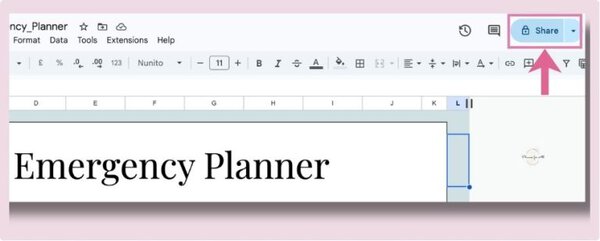
- Click the ‘share’ button in the upper right-hand corner of your Google Sheet.
2. When you click on the ‘Share‘ button, a pop-up window will open up. In the ‘General Access‘ section click on the dropdown and select ‘Anyone with Link‘

3. To the right you’ll see a dropdown menu with the options “viewer”, “commenter”, and “editor.” Select “viewer” to ensure that your customers don’t edit your master sheet.
Then click “copy link”

4. Edit the link you copied in another tab and replace Edit word with Copy word

We do this to force your customers to create their own copy of the Google Sheet that they can edit/modify as they want without impacting your master copy.
5. Create a document with your shareable link and download it as PDF. You can brand this document as per your business. Upload it on Etsy for your listing. When your customers buy your listing, this PDF document will be delivered to them.
5. Create multiple listings for the same keyword
One thing people often miss to do is create variations of listings for the same keyword. Yes, Etsy will rank only one of your listings on the first page, but when you create multiple listings targeting variations of the same keyword, then you have a chance to rank for both keywords.

Want an easy way to sell spreadsheets?
Download this DFY spreadsheet template you can sell today in your shop.
This serves two benefits,
1- it gives you data to test which one sells better. For all the research you do, your customer may search for a different keyword to look for the same thing.
If you only create one listing targeting one keyword, then you are missing the chance to rank for other keywords your customer might be using to find the product you are selling.
2 – it gives your multiple listings a chance to rank on the first page, which means customer sees more of your listings and may end up buying one or the other.
The lesson here- test, test, test. Create multiple listings for variations of the same keyword.
6. Keep it simple – one problem one template
Remember, the customer will buy something that solves their problems. And they want to do it quickly without spending lots of time creating it themselves.
The purpose of your spreadsheet should be to save your customers’ time and solve a specific problem.
Don’t intimidate your users with lots of charts or visual graphs. Only provide what is needed to solve the problem so that your customer can get value out of it in minutes.
7. Make easy-to-use sheets
Similar to the above point, make your template super easy to use. Understand your niche and customers and design your sheets accordingly.
Provide easy-to-follow instructions, and provide instruction videos when you can. This will help your customers to understand your sheet easily and use it quickly.
Spreadsheets tend to cost more on Etsy than printables. This is because people want to save time in creating complicated spreadsheets and instead buy done-for-you spreadsheets. They are paying a premium price for a solution to their problem. So it’s your job to make it as easy for them to get that solution as you can.
A happy customer will come back to buy more for future needs.
8. Build your email list
Once you get some customers, start building an email list. Most of the ESPs offer a free account for up to a specific number of subscribers.
Get an ESP provider like Convertkit or Mailerlite to create a signup form. Share that signup form in your shop banner, announcement, or even in your order delivery file.
That way when customers sign up for your email list, you can inform them when you release a new template. If you follow good email marketing, you can even get those people to buy again from your shop when they need another spreadsheet template in
the future.
FAQ
Q1. Is Google Sheets same as Excel?
No, Google sheets is not same as Excel. It is the spreadsheet software offered by Google while Excel is the spreadsheet software available as part of Microsoft Office Suite.
Q2. Is Google Sheets free to use?
Yes, you can use Google Sheets for free as part of Google account.
Q3. Can I sell Google Sheets templates?
Yes, you can easily sell Google Sheets templates that solve your customers’ problems.
Q4. Do people buy Google Sheets templates?
Yes, a lot of people buy Google Sheets templates that are professionally designed and solve their problems. In fact, t here are a lot of Etsy shops selling Google Sheets spreadsheets that make full time income from it.
Q5. What are common Google Sheets templates to sell?
Q6. Is Etsy the only place to sell Google Sheets?
While Etsy is a popular place to sell your Google Sheets spreadsheets, you can sell them at a lot of other places as well. Check out this article about where to sell your Google Sheets spreadsheets.
Selling Google Sheets on Etsy can be lucrative but like any product line, you need to research, create quality products, and provide quality customer service.
Want an easy way to sell spreadsheets?
Download this free PLR Google Sheet spreadsheet template you can sell today in your shop.
Related Products & Posts
Get a complete budget planner in Google Sheets you can sell
Get a weekly Meal planner in Google Sheets you can sell now
