
By Neha · Where to Sell · 12 min read
Links in this post are affiliate links. I earn a commission if you purchase using these links at no extra cost to you.
In continuation with our series on Etsy alternatives, in this post we will see how to sell Google Sheets on Thrivecart. While Etsy is a popular platform to sell digital products, it involves high competition and fees as well.

That’s not a reason to leave Etsy, it drives discovery and brings buyers to you who would never find you otherwise. But it is a good reason to have a second selling channel where you keep more of what you earn and control the entire customer experience.
I use ThriveCart to sell my own digital products here at Planner for All, and it’s what I recommend to spreadsheet sellers who are ready to build their own sales channel alongside Etsy. This post walks you through how to set it up, how to deliver Google Sheets templates through it, and what makes it worth the investment.
| This is part of the Where to Sell series. If you’re just getting started and haven’t set up Etsy yet, read How to Sell Google Sheets on Etsy first and come back here when you’re ready to expand. |
What Is ThriveCart?
ThriveCart is a mature checkout and sales platform built for digital product sellers. It was founded in 2016, and has become go-to for course creators, template sellers, and digital product businesses that want more control than a marketplace gives them. It’s not a website builder and it’s not a payment processor. It’s the checkout layer in between and it does that one job very well.
You can create sales and checkout pages for your digital products. You send people to the checkout page, they pay, and the product lands in their inbox automatically.
Since it is dedicated to your product, there is no marketplace algorithm, nor competing listings competing with your products. It is a clutter-free checkout process that boosts conversions.
You can connect your payment processor, either Stripe or PayPal. When people pay on Thrivecart checkout, money goes directly to your payment processor. ThriveCart itself charges zero transaction fees, which means whether you’re charging $10 or $100, you don’t pay anything apart from payment processor fees.
ThriveCart Price
ThriveCart charges a one-time fee, currently $495 for the Standard plan with lifetime access. You don’t pay any monthly fees after that. For context, comparable checkout tools charge $59 to $299 every single month so if you use Thrivecart for eighteen months, it pays for itself against those alternatives.

There’s a Pro+ upgrade at $295/year that adds affiliate management and advanced analytics, but for most spreadsheet sellers starting out, Standard is plenty.
There’s no free trial, but they offer a 14-day refund policy, which gives you enough time to test the whole setup properly.
| Worth knowing: Pricing details are current as of 2026. Thrivecart updates their plans periodically check their site directly at thrivecart.com before you purchase. |
Etsy vs ThriveCart: Pros/Cons
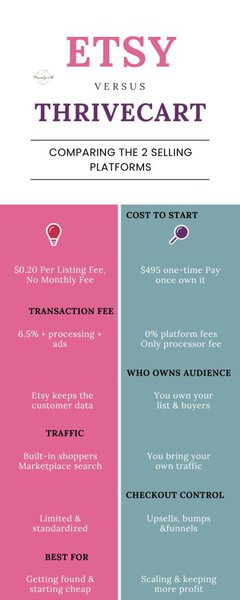
Most people think that they can sell either on Etsy or on Thrivecart. I would like to address this first – it is not either/or scenarios, instead think of them like complementary platforms. Each has its benefits that works well for them.
Etsy’s strengths: Etsy’s biggest strength lies in built-in traffic. Buyers find you through search without you doing any marketing. This is enormously valuable when you’re starting out and have zero audience.
ThriveCart’s strengths: Clutter free experience, your product is not competing with other listings for customers’ attention. Also, there is no transaction fees when selling on Thrivecart. One little known benefit of selling on Thrivecart is that you get full customer data and email addresses (Etsy does not give you this). This gives you the ability to nurture and promote your other related products to them through bundles, offer payment plans, and run affiliate programs. Another benefit is since you’re selling on your site, the checkout experience reflects your brand, not Etsy’s.
So which one should you sell on? My honest answer? Both.
Use Etsy to get discovered and tap into existing customer base. While selling on Etsy, market your products and start building your email list, and sell higher-ticket products or bundles from Thrivecart. Many sellers eventually find that 40–60% of their revenue comes from their own platform once they have an audience — and all of that revenue comes at dramatically lower cost.
Feature | Etsy | ThriveCart |
|---|---|---|
Built-in audience | Yes, millions of shoppers searching daily | No, you bring your own traffic |
Transaction fees | 6.5% + listing fee + payment processing | Zero transaction fees |
Upsells & order bumps | Not available | Built in, big revenue lever |
Email list building | Very limited – Etsy keeps buyer data | Integrates with your email platform. Check how to integrate Thrivecart and Kit |
Brand control | Partial – you’re inside a marketplace | Fully your own brand |
Pricing flexibility | Basic coupons and sales only | Full control – bundles, subscriptions, trials |
Discovery potential | High. Etsy SEO drives consistent organic traffic | None. You’re responsible to drive all traffic yourself |
How to Set Up A Google Sheets Product on ThriveCart

Setting up your Google Sheets to sell on Thrivecart isn’t scary, though it involves some steps.
1. Create your account and connect your payment processor
Sign up at Thrivecart.com and connect your Stripe or PayPal account under Settings – Payment processors.
2. Create your product
In your ThriveCart dashboard, click Products → Add new product. Choose Digital product as the product type. Give it a name, a label, and a URL slug – this is what appears on the checkout page and receipt, so use the full name you want buyers to see.
Set your price and select the payment processor. ThriveCart supports one-time payments, subscriptions, and payment plans. For Google Sheets spreadsheet templates, a one-time payment is the right choice.
3. Set up product delivery
This is where you configure how to deliver your Google Sheet template once payment is received. In the product you created in Step 2- go to Fulfillment section.
Thrivecart gives you 2 options – either send them to a URL or you can add them to Thrivecart course platform.
3.1 Thrivecart Course Platform:
Thrivecart provides course platform where your customers get access to a course on purchase of a product. You can create a course with Google Sheets template link.
When they purchase your product, they get access to the course and open Google Sheets link. Along with the Google Sheet link, you can also include bonus, or link to your other products. This gives customers a preview of your other products.
3.2 Send them to a URL
If you select, Send them to a URL option, you can send your customers directly to Google Sheet template link. You can also control how long url remains active.
4. Design your checkout page
Now that you’ve created your product, attached fulfillment, next step is to create a conversion-boosting sales/checkout page.
Luckily, ThriveCart has a page builder so you don’t need design skills to get a clean, professional page. You can also use free or paid Thrivecart checkout page templates that you can customize to create your pages quickly.
Some things you want to include in your product page: your product name and a description of what it does and who it’s for; a product mockup image (a screenshot of your spreadsheet on a laptop is the main visual trust signal); bullet points of what’s included; social proof (pull your best Etsy reviews onto the ThriveCart page buyer reviews convert); and a short FAQ or guarantee section to reduce purchase hesitation for buyers who’ve never bought from your own site before.
A good Thrivecart template already has all these sections, you just replace placeholder information with your product details, and you’re ready to launch.
The copy on your checkout page is the biggest lever you have.Spend some time writing conversion boosting copy as it is the most important factor in your conversion.
5. Add an order bump
The main power of Thrivecart lies in creating powerful sales funnels. You can add order bump, upsell, downsell which when strategically created can increase your average order value.
Starting with order bump – an order bump is a checkbox offer that appears on the checkout page before the buyer completes their purchase. This is a related product that may add more value to the customer.
Why customers buy it? Because the buyer already has their card out ready to buy your main product. If they present a valuable add-on product chances of conversion are pretty high.
Sample order bump: Say, if someone’s buying a monthly budget tracker, a debt payoff tracker as an order bump at a reduced price makes sense.
Upsells
After checkout, you can show a second offer, this could be a bundle upgrade or a premium version. Customer doesn’t need to re-enter payment details. If they click, the new product (or premium) is added to the cart. Conversion rates are lower than order bumps (typically 5 to 15%) but it adds up at scale.
Upsell example: say someone bought the budget tracker → the upsell could be complete personal finance bundle at a combined price less than buying each separately.
| A simple funnel example: Main product ($15 budget tracker) → Order bump ($7 debt payoff tracker, 25% take rate = average order $16.75) → Upsell ($27 complete finance bundle, 10% take rate). This three-step flow increases revenue per visitor by roughly 30% with no additional traffic needed. |
6. Customize your thank-you page
Once the purchase is completed, buyers land on a thank-you page. You can customize it as much as you want. Some ideas to personalize this Tank You page include: add a short message, remind them to check email for the download link, and include a next step like your Facebook group, your email signup, or another product.
As a person has just purchased something from you, they are most engaged with your brand. Use this engagement to drive them into your business without being pushy.
7. Test everything, then go live
Before you start driving traffic to your Thrivecart checkout, test the full flow. The easiest way to do this is by generating 100% coupon in Thrivecart and using it to make a purchase.
Test checkout, payment, email delivery, PDF download, Google Sheets link. If anything feels confusing or broken, fix it now. Once everything works as expected, start driving traffic to your page.
Frequently Asked Questions
Q1. Can I sell Google Sheets templates on Thrivecart?
Yes. ThriveCart supports any digital product delivered via a link or course. Set your Google Sheet to ‘anyone with the link can make a copy,’ embed that force-copy link in a branded PDF, upload the PDF as your delivery file in Thrivecart course platform, and ThriveCart handles delivery automatically after every purchase.
Q2. Do I need a website to use Thrivecart?
No, that’s another benefit of Thrivecart. Thrivecart hosts the checkout page on its server so you don’t need a domain or website. That said, you do need a way to drive traffic to your checkout link. A blog, Pinterest account, or email list is what makes the whole system work. Without traffic, it is very difficult to make sales of your Google Sheets templates.
Q3. Can I sell the same spreadsheet on both Etsy and Thrivecart?
Yes. You can sell same product on both Etsy and Thrivecart as there’s no exclusivity requirement.
Q4. Is Thrivecart worth it if I’m just starting out?
Tbh, probably not. If you’re building your first few products and have no existing audience, Etsy’s built-in traffic is far more valuable than ThriveCart’s features. Start with Etsy, build your catalogue and reviews, and add ThriveCart once you have an email list, a blog, or social media followers to send to your own checkout pages.
Q5. What’s the difference between Thrivecart Standard and Pro+?
Standard ($495 one-time) gives you everything you need to sell digital products – checkout pages, order bumps, upsells, email integrations, and a course platform for course hosting. While this is enough for selling Google Sheets templates, Pro+ ($295/year) gives more features such as: affiliate management, advanced reporting, and UTM tracking.
Q6. How does Thrivecart handle international taxes?
Thrivecart does not automatically handle VAT collection for international sales on the Standard plan. If you’re selling to EU customers and have VAT concerns, research your specific jurisdiction. Many smaller digital product sellers operate below VAT thresholds and aren’t affected, but it’s worth being aware of.
Q7. What Types of Spreadsheets Work Best on Thrivecart?
Higher priced spreadsheets tend to sell much better than on Etsy. If you’re doing majority of marketing and driving traffic to your Etsy store, then you can easily send that traffic to your Thrivecart checkout page.
Once you’ve your marketing channel and audience in place, you can start selling Google Sheets spreadsheets on Thrivecart.
Q8. How to drive traffic to your Thrivecart checkout page?
You can use any of the marketing channels to drive traffic to your Thrivecart checkout page. You can write blog post, Pin linking straight to your ThriveCart checkout, use email marketing and much more. Identify one or two channels where you can be consistent and start with those.
Ready to Set Up Your First ThriveCart Product?
If you’re already selling spreadsheets on Etsy and have some traction, may be a few sales a month, some reviews, maybe a small email list, ThriveCart is worth adding to your toolkit. Start by listing one of your best-selling templates there with a proper order bump and see how the funnel performs. The setup takes an afternoon. The fee savings and email list growth start immediately.
If you’re still figuring out what to build and sell, that comes first. Grab a free PLR spreadsheet template below, customize it with your branding, and list it on Etsy, and come back here when you’re ready to build your own direct sales channel. A product that’s out in the world beats a perfect one still sitting on your desktop.
Related Articles
